The End of the Manual Grind
For decades, creating a "speed paint" or a "drawing reveal" video was a test of endurance. Digital artists had to record their screens for eight, ten, or even twelve hours, only to spend another three hours in a video editor speeding up the footage and carefully cutting out mistakes. For those who weren't master illustrators, the only option was "manual tracing"—using a path tool to trace over a photograph point-by-point. It was a high-friction, low-reward workflow that kept the most engaging art format out of the hands of casual creators.
In 2026, that barrier has been completely demolished. The rise of the auto draw video from image engine has changed everything. Now, instead of tracing lines, you direct AI to perform them. Automatic photo drawing animation is no longer a manual labor task; it is an orchestrated performance. With the right speedpaint free online tools, you can move from a flat JPEG to a cinematic drawing reveal in under 60 seconds.
This guide explores how computer vision has replaced the pen tool, why automated reveals are the #1 engagement hook on social media, and how you can master this new creative workflow for free.
What is an 'Auto-Draw' Video?
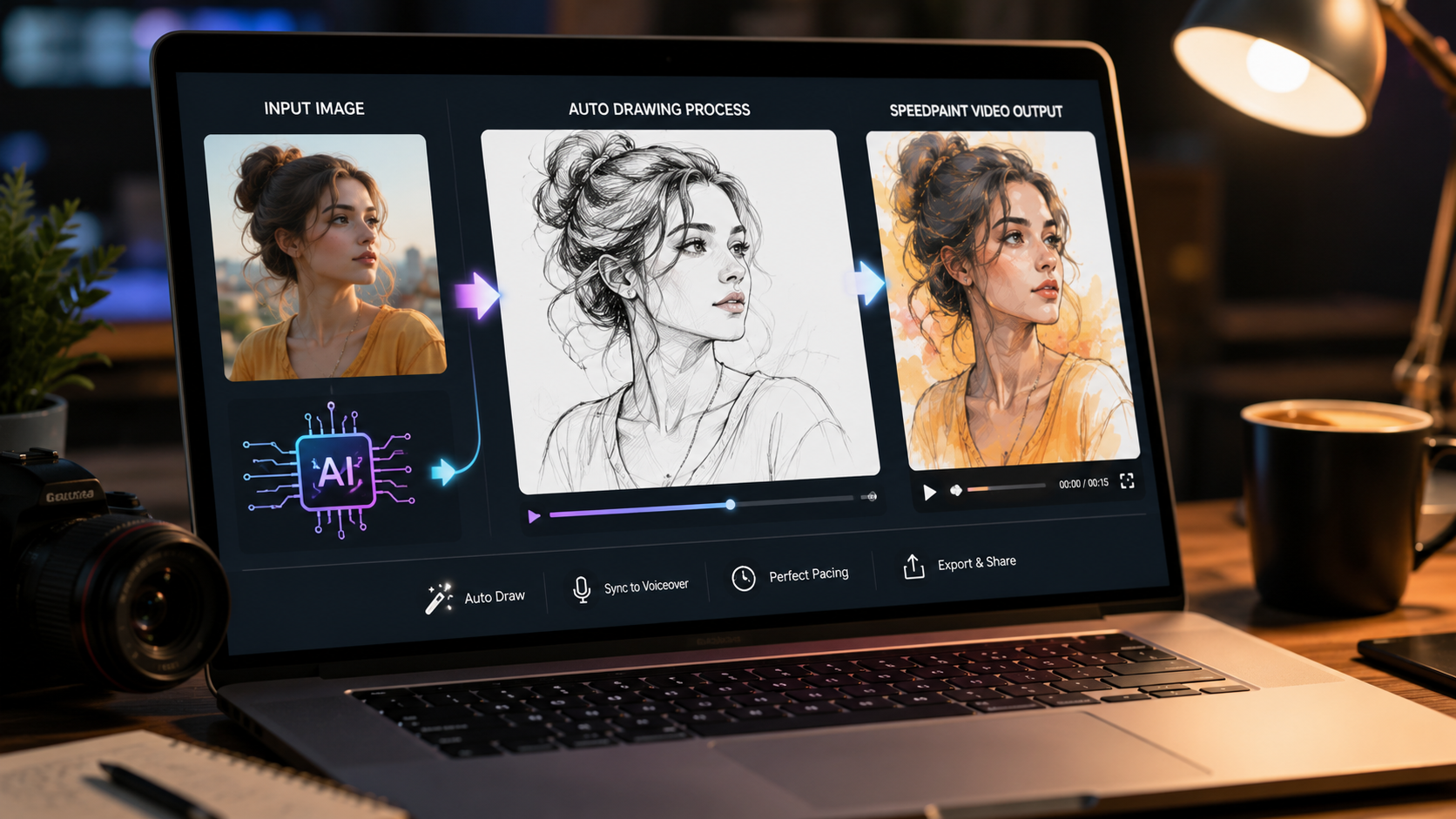
When we talk about an auto draw video from image, we aren't talking about a simple "sketch filter." A filter just changes the texture of pixels. An "Auto-Draw" engine is a form of Automatic Photo Drawing Animation that actually reverse-engineers the structural hierarchy of an image.
Think of it as "Temporal Deconstruction." The AI analyzes your photo, identifies the foundational "bones" (the high-contrast edges), and then calculates a logical sequence to redraw them. It simulates the human artistic process by focusing on the large, structural shapes first before moving into the fine details and color washes.
For the viewer, the effect is hypnotic. It taps into the psychology of satisfying content. By starting with a blank canvas and revealing the image stroke-by-stroke, you create a "Curiosity Gap" that forces the audience to stay until the final reveal.
The Technology: How AI Finds the Lines
To achieve high-quality automatic photo drawing animation, our system utilizes advanced computer vision via OpenCV.js. Unlike cloud-based tools that might store your data, our speedpaint free online tool performs all these calculations locally in your browser's sandbox.
Canny Edge Detection
The first stage is identifying boundaries. The AI scans for "intensity gradients"—sharp changes in color and brightness that define an object's silhouette. This creates the 'blueprint' for the auto draw video from image.
Pathfinding Logic
Once the edges are found, the AI doesn't just "fade" them in. It uses pathfinding to connect nearby points into fluid, continuous lines. It mimics the motion of a digital stylus, making the automatic photo drawing animation feel authentic.
Color Quantization
For the final phase, the AI groups similar colors into 'islands.' It then performs a 'wash' across these regions, revealing the full-color masterpiece as if an artist were applying layers of paint.
Why Manual Tracing is Obsolete for Creators
In the attention economy of 2026, speed is the ultimate competitive advantage. If it takes you four hours to create a speedpaint video and it takes your competitor four minutes, they will out-post you 60-to-1.
By using an auto draw video from image pipeline, you can turn every photo in your gallery into a high-engagement video asset. This allows for:
- Instant Trending Content: Did a new movie trailer just drop? Generate an AI image of the hero and create an automatic photo drawing animation in two minutes to ride the trend while it's hot.
- Perfect Pacing: Our AI Story tool syncs the drawing speed to a voiceover perfectly—something that is almost impossible to do manually without professional editing skills.
- Zero Skill Barrier: You don't need to know how to draw. You just need to know how to direct. Our speedpaint free online tools empower marketers, educators, and storytellers to look like master artists.
Step-by-Step: How to Create Your First Reveal
Ready to automate your creative process? Follow these steps to generate a professional auto draw video from image:
- Conceptualize or Capture: Start with a high-contrast photo. The more distinct the subject is from the background, the cleaner the automatic photo drawing animation will be. If you don't have a photo, use our unrestricted generator to create one.
- Upload to the Animator: Head to our Drawing Tool and drop your image.
- Format for Vertical: Social media algorithms demand 9:16 portrait. Use our built-in cropper to fill the mobile screen.
- Set the Performance Speed: Adjust the speed slider so the drawing finishes in 12-15 seconds. This is the 'retention sweet spot' for Reels and TikTok.
- Enable Video Recording: Make sure the "Record Animation Video" switch is on. Hit Start and watch the AI perform your reveal.
- Export & Sound: Download your MP4 and add a trending audio track in the host app to maximize discoverability.
Pro Tip for Viral Retention
In your video editor, add the original, finished photo for exactly 0.5 seconds at the very start of the video. This "tease" acts as a visual hook, showing the brain the final reward and convincing it to stay for the process of the automatic photo drawing animation.
Stop Tracing, Start Performing
The tools for professional speedpaint free online creation are at your fingertips. No sign-up, no cost, 100% private local rendering. Turn your first photo into a masterpiece today.