
Why Everyone Converts Their Pet First
Ask people what photo they would turn into a coloring page and the answer is rarely a landscape. It is the dog asleep in a sunbeam, the cat mid-yawn, the puppy photo from the first week home. A generic coloring book gives a child a dog; a converted photo gives them their dog — same crooked ear, same spot over one eye. That recognition is the whole magic, and it is why pet conversions are the most popular use of our photo to coloring page converter.
It is also, honestly, the hardest conversion to get right. Fur is the enemy of edge tracing, and a bad result — a scribble where a golden retriever should be — ruins the gift. The good news: the problem is understood, and it is exactly what the Pet Fur preset exists to solve.
How to Turn a Pet Photo into a Coloring Page
- 1. Open the converter. Go to the free photo to coloring page converter — no account or sign-up.
- 2. Upload your pet's photo. A clear close-up or a tidy full-body shot, straight from your camera roll. The photo is processed in your browser and never uploaded anywhere.
- 3. Choose the Pet Fur preset. It softens the coat and keeps the important lines: outline, ears, eyes, nose, and markings. Then tune with the Detail slider — up if a marking disappeared, down if the coat still looks busy.
- 4. Download the PNG or print it. The printout is just the coloring page, full-sheet, ready for crayons.
A Real Example: The Pet Fur Preset at Work
This white wolf was converted with the Pet Fur preset, using the exact converter on this site — no hand-drawing, no cleanup afterwards. Wolves are the ultimate stress test for fur, and the preset keeps exactly what matters: the ear tips, the eyes, the muzzle, the ruff, the paws. If it can outline a wolf's double coat this cleanly, your dog or cat is well within its comfort zone.
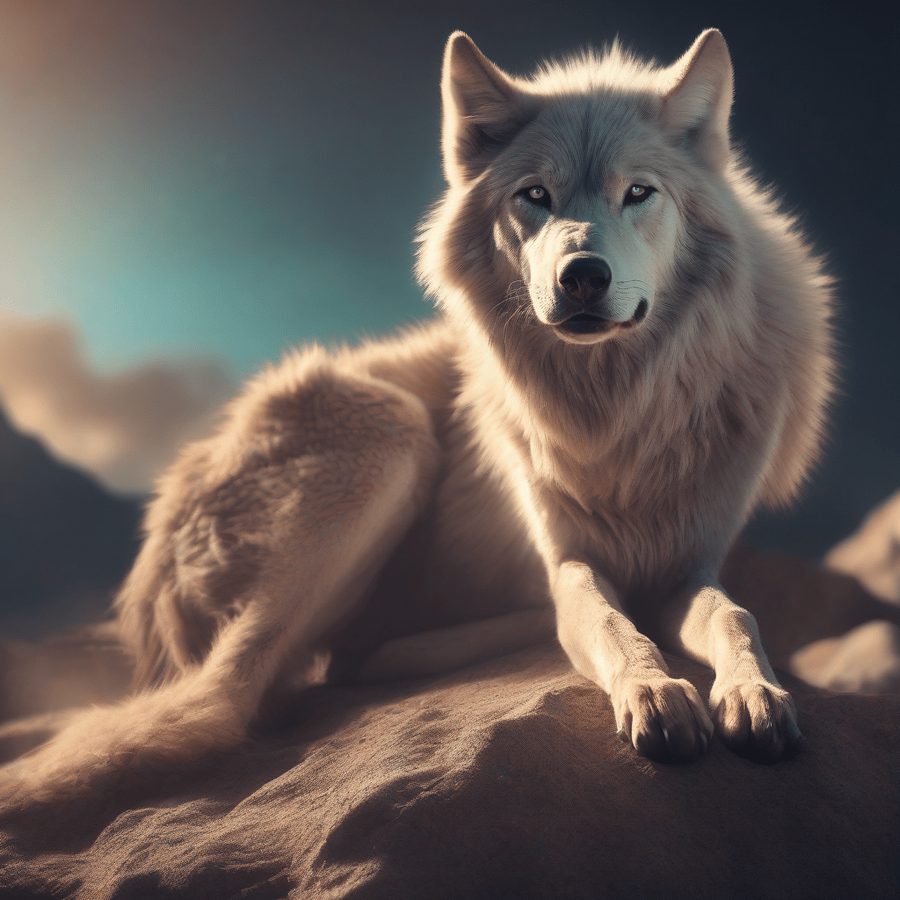
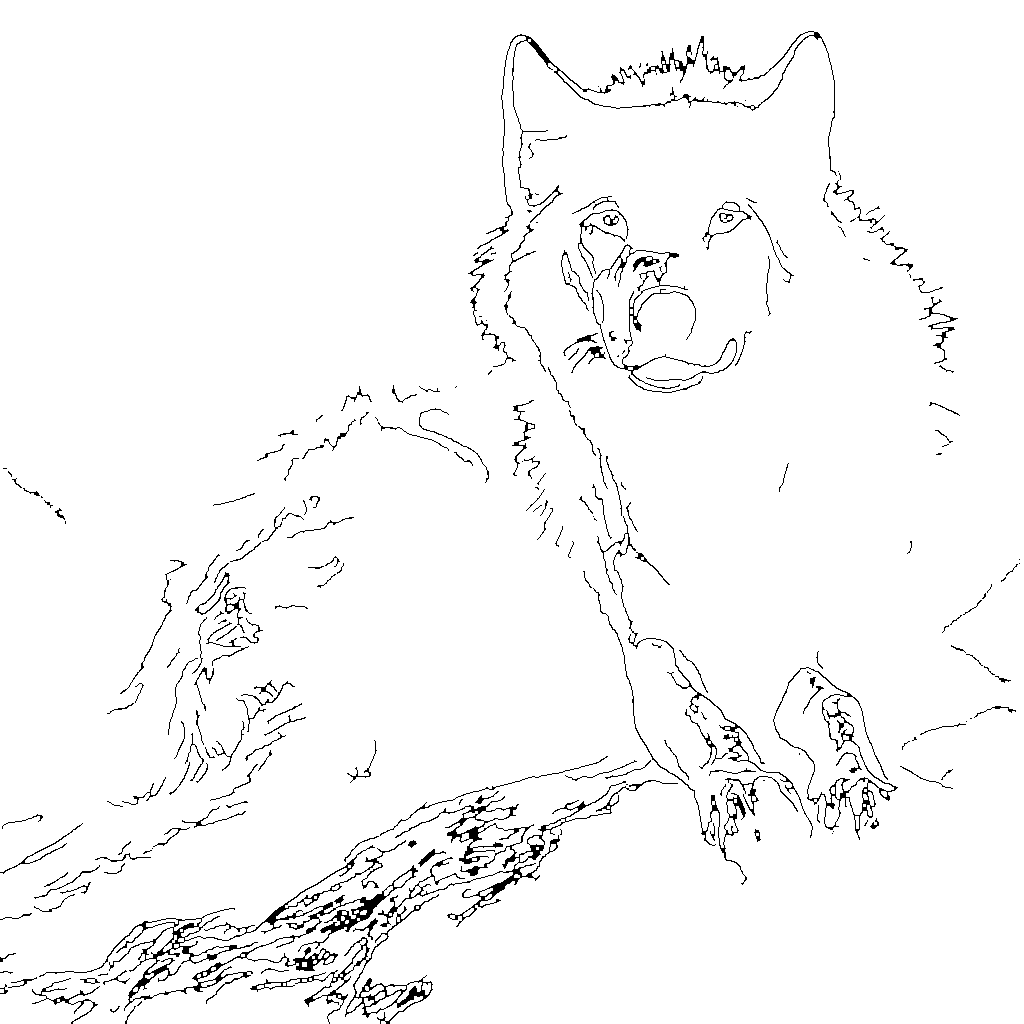
You can download this page free from the samples on the converter page.
Picking a Pet Photo That Converts Cleanly
- Get the face. Eyes, nose, and ears carry the likeness. A close portrait converts better than a distant dot on a lawn, however cute the memory.
- Mind the contrast. A black dog on a dark sofa (or a white cat on white bedding) gives the tracer almost nothing to follow. A background that differs from the coat is the single biggest quality boost.
- Use the original photo. Screenshots and messenger-shared copies are shrunk and blurred; the line art inherits all of it. Dig the original out of your camera roll.
- One pet per page. Two animals tangled together in sleep are adorable and nearly untraceable. Convert one pet per photo; make a second page for the second pet.
How the Pet Fur Preset Tames Fur
A furry coat is thousands of individual hairs, each with its own tiny highlight and shadow. A standard edge tracer dutifully draws every strand it can see — and the result looks like a ball of wire with eyes. The Pet Fur preset changes the order of operations: it blurs the coat more aggressively first, merging the strands into smooth tonal regions, and only then traces. What survives the tracing is the architecture of the animal — the silhouette, the face, the patches and stripes — while the static disappears.
The Detail slider then becomes a markings dial. Tabby stripes, a border collie's blaze, a calico's patches: slide up until they appear, and stop before the coat texture comes back with them. Two minutes of nudging is the difference between "a dog" and unmistakably yours. (The converter's Simple and Detailed presets handle the rest of your photos; our full converter guide compares all three.)
Ideas: What to Do with a Pet Coloring Page
- Let kids color their own pet. Print a small stack — children love repeating a page of their own dog with different colors, and it makes a rainy afternoon feel personal. Finished pages can even be animated in our Kids section.
- Make it a gift. A framed coloring page of a friend's pet — colored by you, or left blank with a nice set of pencils — is a genuinely personal present that costs almost nothing.
- Keep a memory. For a pet who has passed away, a coloring page from a favorite photo is a gentle keepsake — something for a memory book, or for a child to color while they remember their friend.
- Print a whole pack. One page per family pet, per grandparent's cat, per classroom hamster — a custom coloring book no store sells.
Frequently Asked Questions
How do I turn a pet photo into a coloring page?
Is it free to make a coloring page of my pet?
Why does fur look messy in some coloring page converters?
What is the best pet photo to convert?
Can I make a coloring page of a pet that has passed away?
Can kids color a page of their own pet?
Your Pet, as a Coloring Page — Free
No sign-up, no watermark, and your photo never leaves your device.
Convert Your Pet Photo