
What the Converter Actually Does
A coloring page is really just two things: the outlines of a picture, and none of its color. So the converter works the way a patient artist would. First it drains the photo to grayscale, then it softens the image slightly so tiny textures — grass, fabric weave, fur strands — do not turn into noise. Then it traces every edge where light changes sharply: the line of a jaw, the rim of a coffee mug, the roofline of a house. Finally it removes everything except those traced lines and prints them black on white.
That sounds simple, but the balance is everything. Trace too eagerly and a portrait drowns in wrinkles and stray lines; trace too gently and a face loses its nose. That is why a good converter gives you presets and a detail control instead of one fixed setting — and why the same photo can become a bold toddler page or fine line art for an adult, depending on the choices you make.
How to Convert a Photo into a Coloring Page
The whole process takes under a minute, and nothing is installed or uploaded:
- 1. Open the converter. Go to the free photo to coloring page converter — no account, no sign-up.
- 2. Upload your photo. Any JPG, PNG, or WebP works: a portrait, a pet, a house, a car, a favorite toy. The file stays on your device the entire time.
- 3. Pick a style. Simple for bold outlines, Detailed for fine line art, or Pet Fur for animals. Nudge the Detail slider until the preview looks right — more detail for older kids and adults, less for young children.
- 4. Download or print. Save the PNG, or print straight from the page: the printout is only your coloring page, sized to fill the sheet.
A Real Example: Photo In, Coloring Page Out
Here is an unedited conversion from the tool itself — a young artist drawing on a tablet, converted with the Detailed preset. Notice what survives: her profile, the tablet, the little house she is drawing, the jar of pencils. And notice what the converter wisely drops: the soft-focus background and the warm indoor light, which would only clutter a page meant to be colored.
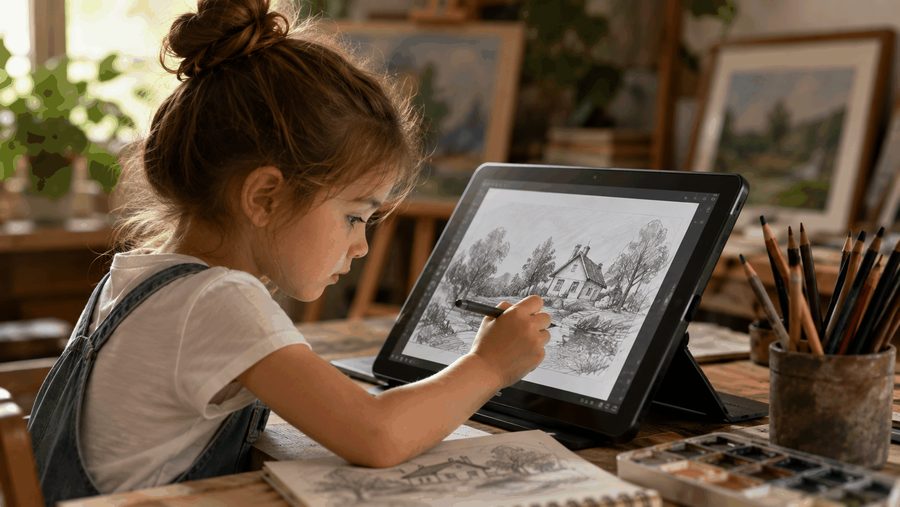
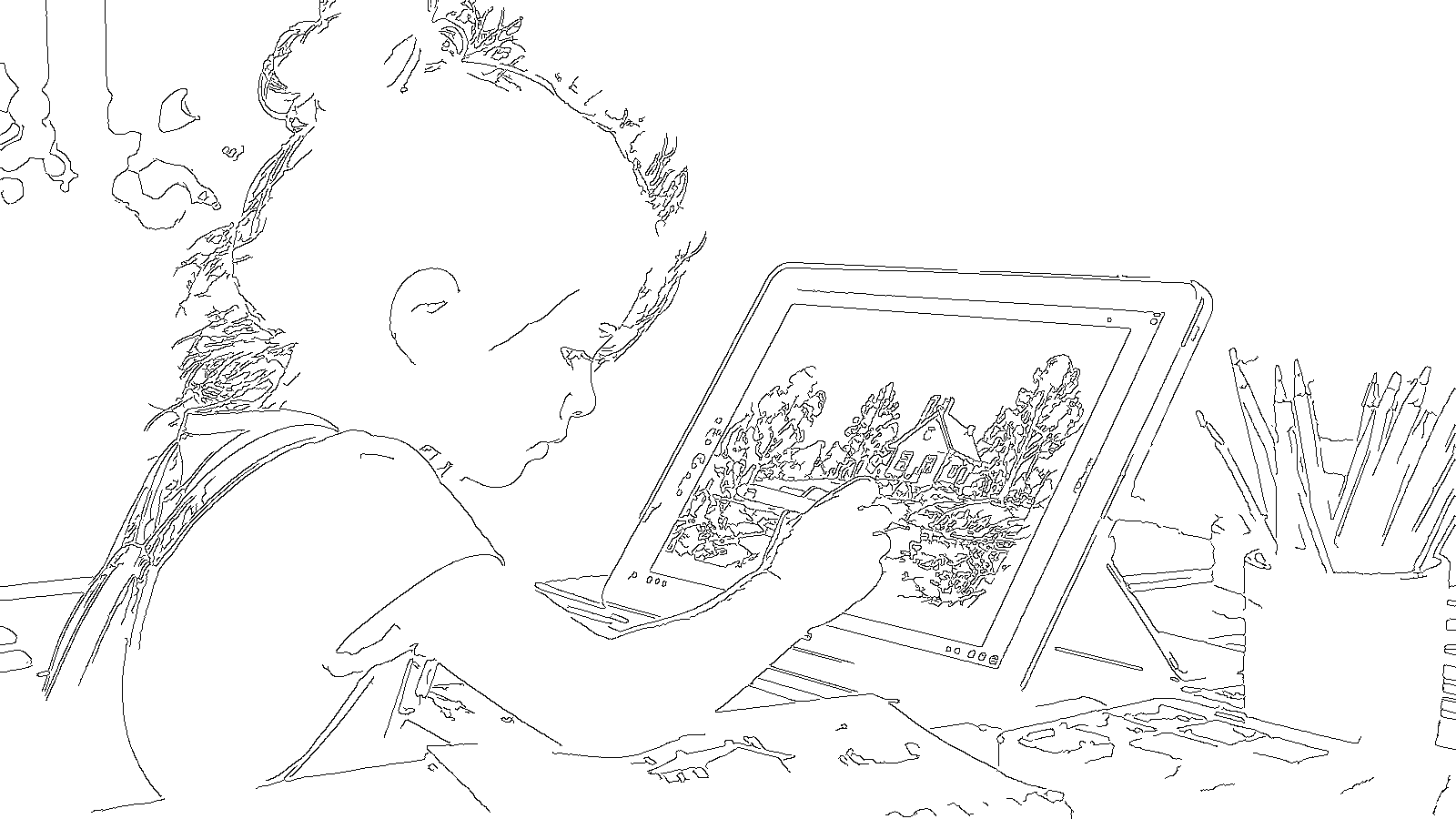
You can download this exact page — and three more samples, including a skyline and a wolf — from the converter page.
The 3 Styles, and When to Use Each
- Simple — for young kids and quick pages. Bold, sparse outlines with big open areas that little hands can fill. Best for toddlers and preschoolers, and for busy photos that need taming.
- Detailed — for older kids, teens, and adults. Keeps fine lines: hair, facial features, textures, backgrounds. This is the preset behind both samples on this page.
- Pet Fur — for dogs, cats, and anything fluffy. Fur defeats ordinary edge tracing, so this preset softens the coat first and keeps the markings that make your pet recognizable. Our pet photo coloring guide goes deeper on this one.
Whichever preset you start with, the Detail slider is your fine control: slide down to erase clutter, slide up to recover a feature that went missing — an eye, a smile, a pattern on a shirt.
Which Photos Make the Best Coloring Pages
- One clear subject. A single person, pet, or object against a plainer background converts far more cleanly than a crowd scene.
- Good light, real contrast. A subject that stands out from its background gives the tracer strong edges to follow. Backlit and very dark photos are the hardest.
- The original file, not a screenshot. Messaging apps and screenshots shrink photos hard, and the line work inherits every blur. Upload the full-resolution original whenever you can.
- Faces turned toward the light. For portraits, eyes and mouths are what make a coloring page feel like the person — make sure they are lit and in focus.
Printing Your Coloring Page
The download is a PNG with pure black lines on pure white — no grays to muddy a printout. Click Print / Save as PDF on the converter and the page is laid out to fill a letter or A4 sheet with nothing else on it. Regular printer paper is fine for crayons and pencils; slightly heavier paper behaves better with markers. Printing a birthday photo, a class picture, or the family dog as a stack of coloring pages costs pennies and keeps a room of kids busy for an hour.
And when the coloring is done, the fun does not have to stop: in the Kids section, finished coloring pictures draw themselves into animations. Prefer moving pictures from the start? The same photo can also become a speed drawing video with our drawing animation tool — one photo, two completely different keepsakes.
Frequently Asked Questions
What is a photo to coloring page converter?
Is the photo to coloring page converter really free?
Is my photo uploaded to a server or stored?
What photos make the best coloring pages?
Can I turn a pet photo into a coloring page?
What file do I get when I download?
Turn Your Photo into a Coloring Page — Free
No sign-up, no watermark, and your photo never leaves your device.
Open the Converter